How to Clean CRM Data: A Step-by-Step Checklist (Free Tool Included)
By Jawad Chafai, RevOps and GTM engineer ·
A practical 10-step checklist for cleaning CRM data before an import or migration: duplicates, emails, phone numbers, money, dates and deal stages, plus how to keep it clean.
Every CRM gets messy. Reps type phone numbers five different ways, imports bring in duplicates, and a deal stage called "Closed Won" ends up with four spellings. Then the dashboard shows the wrong number and nobody trusts it.
This is the checklist I use to clean CRM data before an import or migration, in the order that saves the most rework.
Why CRM data quality matters
Bad data is not a cosmetic problem. In Validity's State of CRM Data Management in 2025, 76% of respondents said less than half of their organisation's CRM data is accurate and complete, and 37% said they lose revenue as a direct result of poor data quality. Gartner's often-quoted estimate puts the cost of poor data quality at $12.9 million a year on average, though that figure comes from a survey of large enterprises using data quality vendors, so read it as a signal of scale rather than a benchmark for your team.
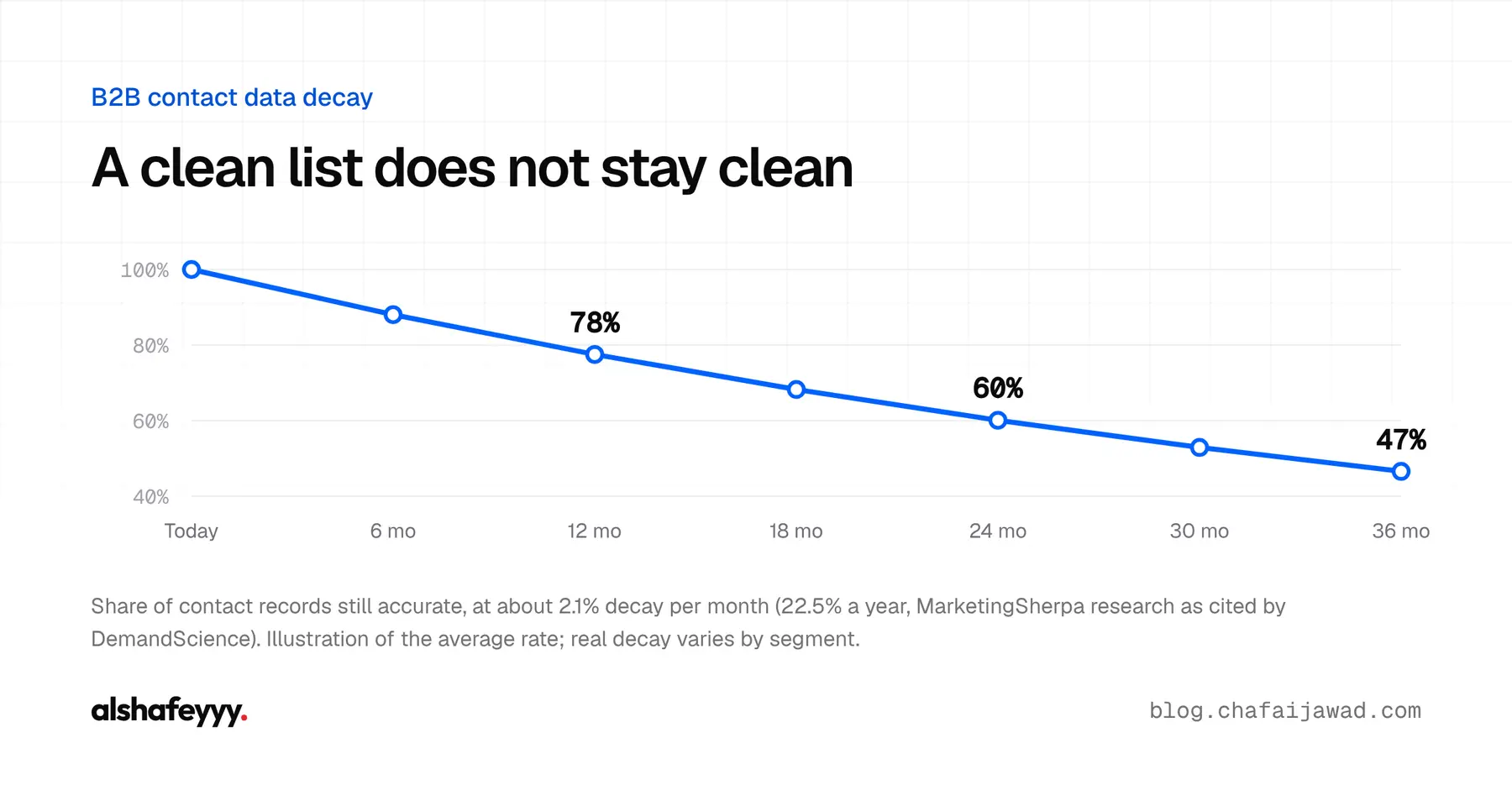
And a clean list does not stay clean. B2B contact data decays at roughly 22.5% a year, about 2.1% a month, according to MarketingSherpa research as cited by DemandScience: people change jobs, companies rebrand, numbers change.
Before you start
- Export everything, including record IDs and every related object you plan to touch (contacts, companies, deals).
- Keep an untouched copy of the raw export. You will want to compare against it.
- Write down your standards first: the phone format, the date format, the currency, and the allowed values for every picklist. Cleaning without a standard just creates a new kind of mess.
- Decide the source of truth for each field. If the CRM and the billing system disagree on a company name, which one wins?
Step 1: Profile every column
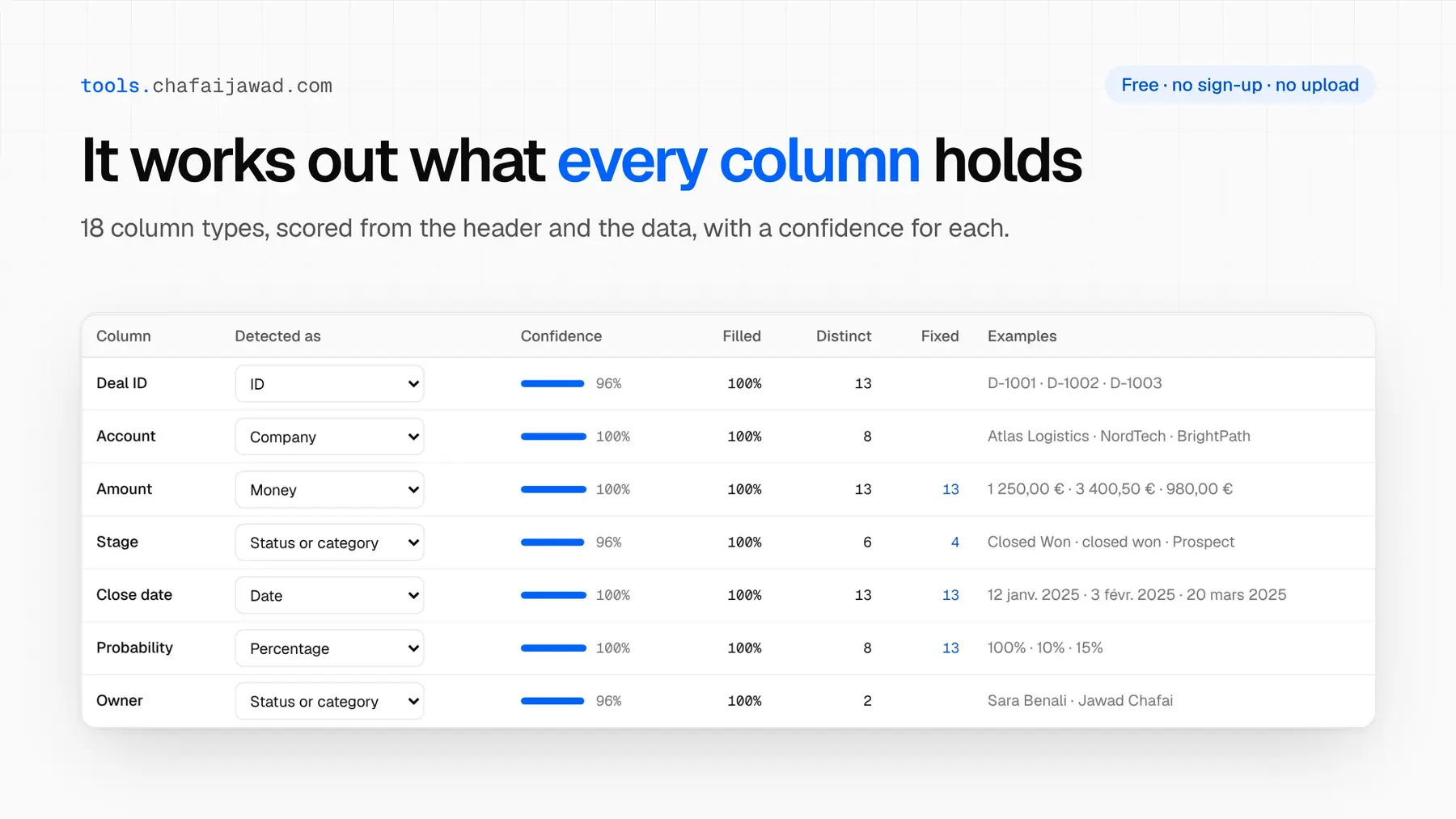
Before changing anything, find out what each column actually contains. A column called "Phone" may hold emails, notes or "N/A". For each column, check how full it is, how many distinct values it has and a sample of real values. This tells you where the work is.
Step 2: Remove junk and placeholder values
Placeholders look like data but break reports and deduplication. Blank out values such as N/A, none, -, test, xxx, 0000000000 and unknown. Remove leading and trailing spaces, line breaks and invisible characters from every text field.
Step 3: Standardise email addresses
- Lowercase every email.
- Fix common domain typos:
gmial.comtogmail.com,hotmail.contohotmail.com. - Flag role addresses such as
info@andsales@: they are fine for companies, risky as a contact's main email. - Flag disposable email domains that point to fake sign-ups.
Step 4: Format phone numbers in one international format
Pick the E.164 format: a plus sign, the country code and the number, with no spaces, like +212661234567. It is unambiguous, works with dialers and makes duplicates easy to spot. Use each record's country to convert local numbers such as 06 61 23 45 67, and keep numbers you cannot validate in a separate column for review instead of guessing.
Step 5: Clean names and company names
- Fix capitalisation:
YASMINE el alaouibecomesYasmine El Alaoui. - Move titles such as Mr, Mrs or Dr out of the name fields.
- Split full names into first and last name when your CRM expects both.
- Normalise company names for matching (
ACME,Acme Inc,acme), but keep the official legal name in its own field.
Step 6: Standardise money, currencies and dates
This is where exports from different countries cause the most damage. 1 250,00 € in a French spreadsheet and 1,250.00 in an American one are the same amount, but a careless import reads one of them wrong.
- Store amounts as plain numbers (
1250.00) and the currency in its own field (EUR). - Store dates as ISO 8601 (
2025-01-12), never as text like12 janv. 2025or ambiguous forms like01/02/2025. - Make percentages and yes/no fields consistent:
15%and0.15should not live in the same column.
Step 7: Fix picklists and deal stages
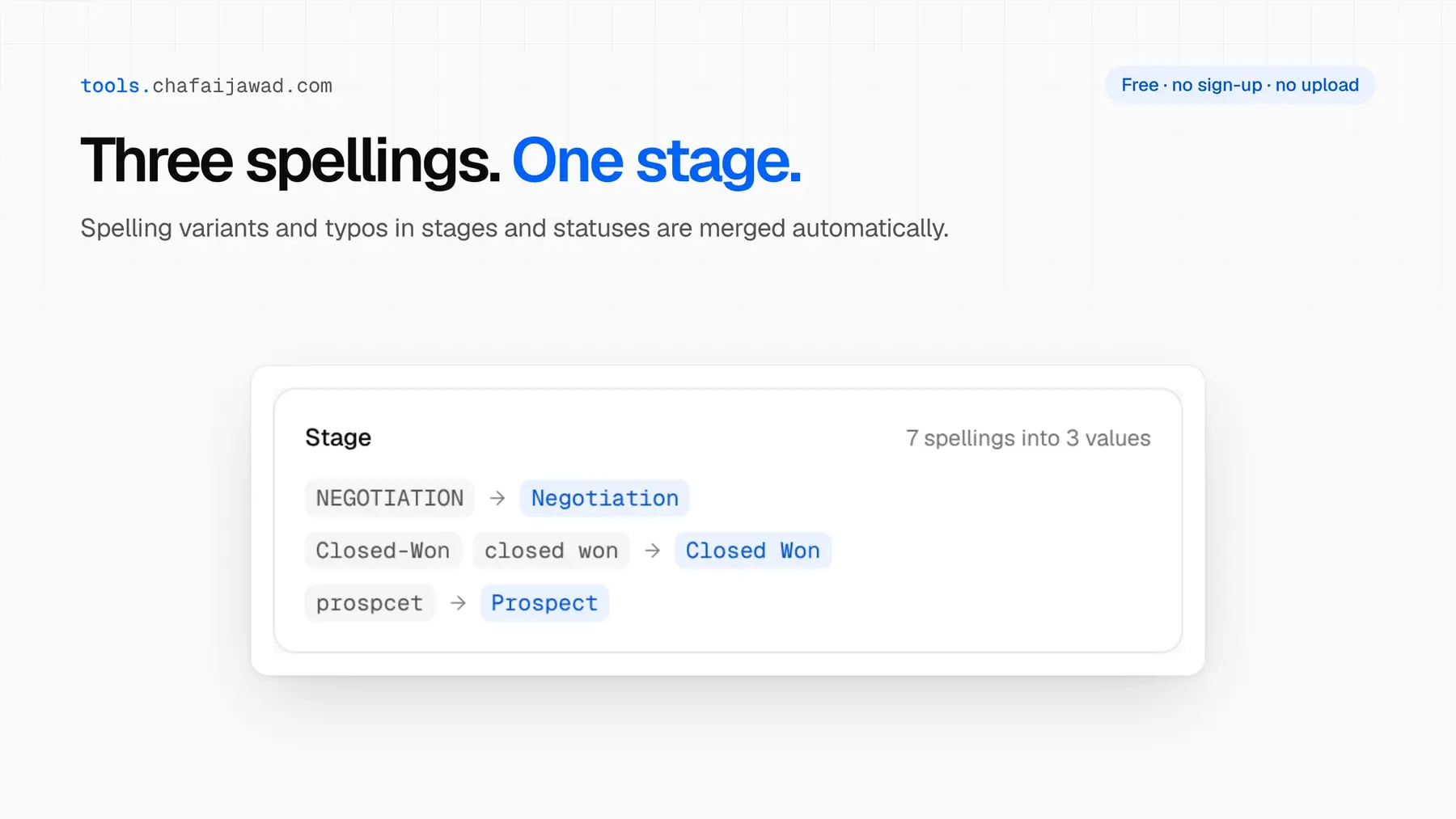
Picklists drift. "Closed Won", "closed won", "Closed-Won" and a typo like "prospcet" all show up as separate stages in a pipeline report. Group the spelling variants and map each one to the single allowed value.
Step 8: Deduplicate with clear merge rules
There are two kinds of duplicates:
- Exact duplicates share a strong identifier: the same email, the same phone in E.164 or the same record ID. These can be merged automatically.
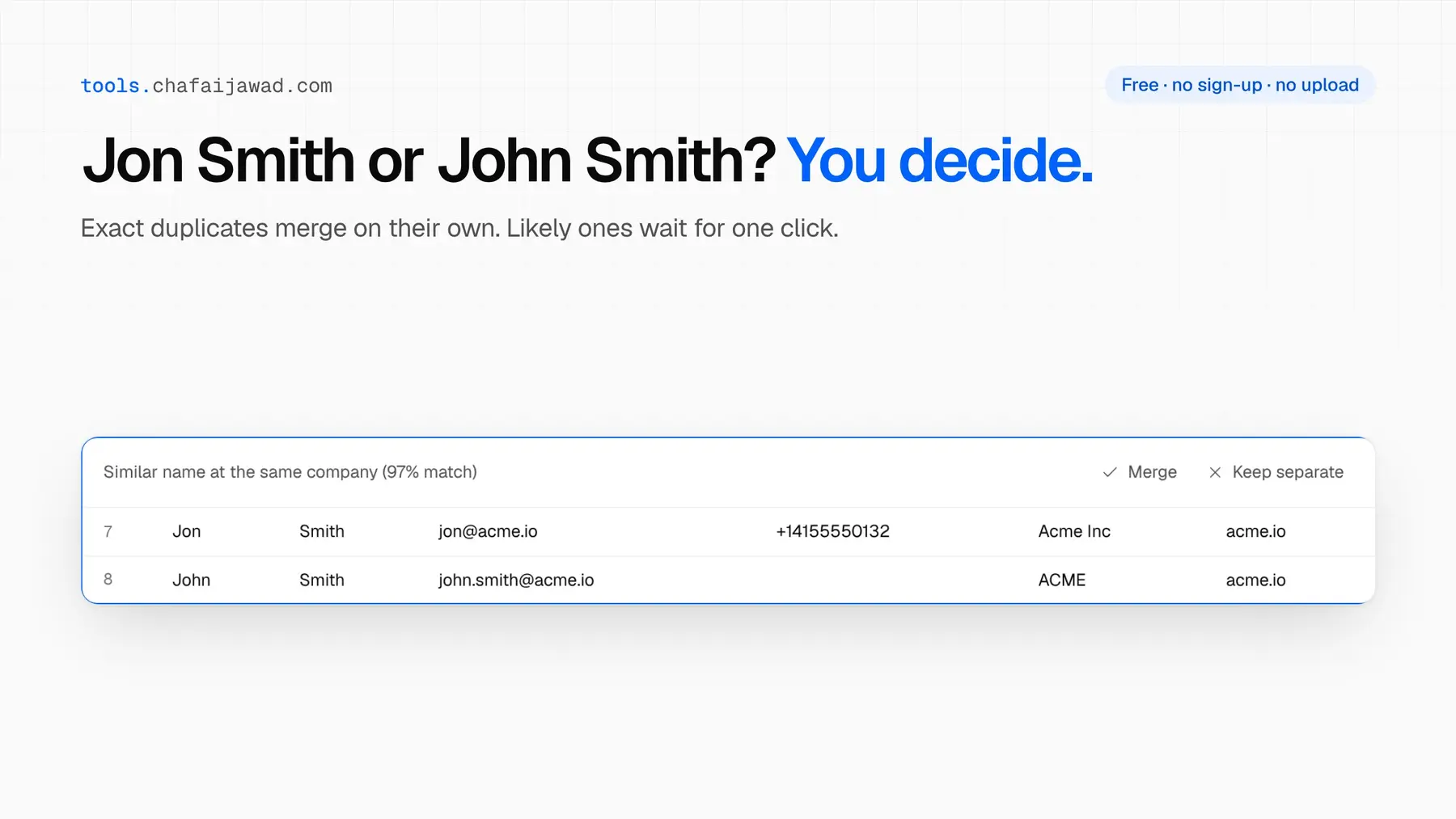
- Likely duplicates look alike but are not identical: "Jon Smith" and "John Smith" at the same company. These need a human decision.
Decide the merge rules before you merge: which record survives (usually the oldest, or the one with the most activity), and what happens to conflicting values. Keep the extra emails and phones from merged records in secondary fields rather than throwing them away.
Step 9: Check the links between objects
A CRM is not one table. Deals point to companies, contacts belong to accounts. After cleaning, check for orphans: deals linked to an account that no longer exists, or contacts whose company name matches nothing in the companies table. Fix them before import, or they will land in your CRM unattached.
Step 10: Test the import, then run it
Import a small batch first, 50 to 100 rows, into a sandbox or test view. Check that fields map correctly, picklists accept the values and nothing is truncated. Compare record counts before and after. Only then run the full import.
How to keep your CRM clean after the cleanup
Cleaning once is a project. Staying clean is a system:
- Validation rules and required fields for the data that matters most, such as country and email.
- Picklists instead of free text for stages, industries and lead sources, on forms as well as in the CRM.
- Duplicate prevention at entry. In Salesforce, matching rules and duplicate rules warn or block users before they create a duplicate. HubSpot has a built-in duplicate management tool for contacts and companies.
- A regular review, monthly or quarterly, to catch decay and new duplicates.
- An owner for each important field, so problems have someone to go to.
A free tool for this checklist
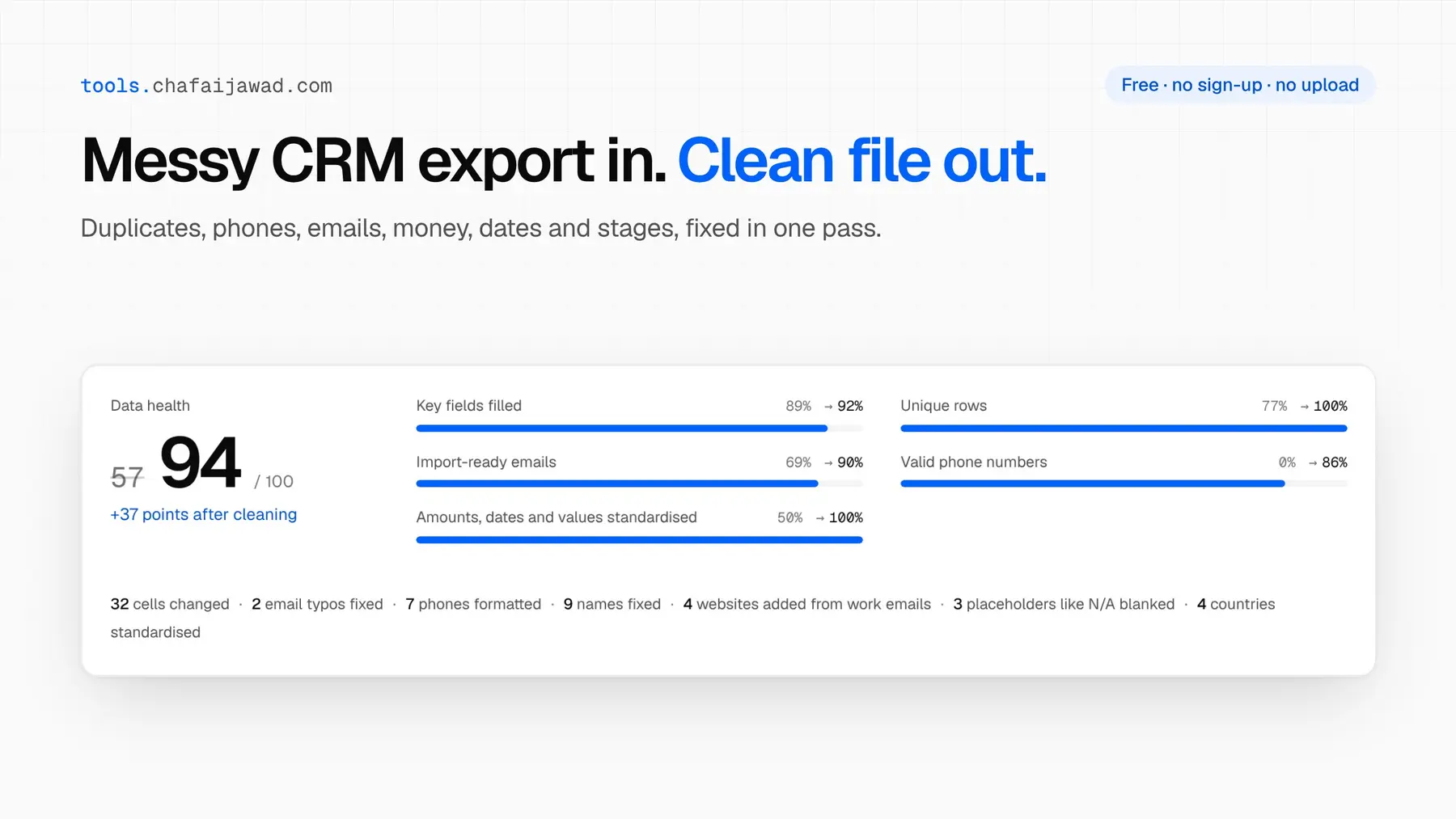
I built the CRM Data Cleaner to do most of these steps in one pass. Drop a CSV or Excel export and it profiles every column, removes placeholders, fixes email typos, formats phones for 240 countries, standardises money, dates and deal stages, merges exact duplicates and lists likely ones for you to review, across every tab of a workbook. It runs entirely in your browser, so the file is never uploaded, and it is free with no sign-up.
FAQ
How often should you clean CRM data? Run a full cleanup before any import or migration, and a lighter review every month or quarter. With contact data decaying around 2% a month, waiting a year means about a fifth of your records are out of date.
How do you find duplicates in Salesforce? Use matching rules to define what counts as a duplicate and duplicate rules to decide what happens when one is created. For records already in the org, run duplicate jobs or export and deduplicate the data before re-importing.
Can I clean CRM data in Excel? For small lists, yes: TRIM, PROPER, Remove Duplicates and find-and-replace go a long way. It gets slow and error-prone with phone formats, fuzzy duplicates and multiple linked tabs, which is where a dedicated tool helps.
What is the best format for phone numbers in a CRM?
E.164: a plus sign, the country code and the number with no spaces, for example +212661234567.
Clean data is the foundation of every revenue system. If you are building automation on top of your CRM, read GTM Engineer vs RevOps: what the role really is in 2026, or see the systems I build.